Microsoft Copilot is becoming essential for modern organizations. Its real strength lies in how seamlessly it integrates with the Microsoft 365 tools employees rely on every day, not just in its AI capabilities. Copilot combines advanced language models with your organization’s data to deliver real-time assistance in Word, Excel, Teams, Outlook, and more. The impact is clear: less time on repetitive tasks, more time on work that matters. Organizations are already seeing measurable time savings and productivity gains across departments. Here’s what that looks like in practice. Before deploying, ensure your environment is prepared. Learn more about Microsoft 365 Copilot readiness and licensing.

IT Teams: From Reactive Support to Proactive Operations
IT teams spend much of their time responding to tickets, troubleshooting, and maintaining systems. Copilot reduces the manual effort behind these tasks, helping teams shift from reactive support to proactive operations. With Copilot in Microsoft 365 Chat or Teams, IT teams can quickly summarize incidents from platforms like Jira or ServiceNow.
Patterns that once took hours to uncover become visible in seconds, making it easier to spot recurring issues and prioritize fixes that matter most to the business. Copilot also generates PowerShell scripts for routine admin tasks, so teams don’t have to start from scratch. It can create and update documentation in Word, keeping systems architecture and policies up to date without adding extra work. For security-focused teams, Microsoft Security Copilot adds an extra layer of automated threat hunting and incident response. The result: IT teams spend less time reacting and more time improving systems.
Executives and Managers: Faster Insights, Better Decisions
For leaders, the challenge isn’t finding data; it’s turning that data into clear, actionable insights fast. Copilot turns fragmented information into actionable insights. After a meeting, managers can instantly generate summaries in Teams that highlight key decisions, discussion points, and next steps, no longer relying on scattered notes or memory.
For reporting, Copilot pulls data from Excel, Power BI, and Outlook to help draft business reports in Word. Reports are faster to create and more comprehensive, using real-time organizational data. Creating presentations is easier, too. What once took hours in PowerPoint now starts with a simple prompt, producing a polished draft ready for review. Leaders spend less time compiling information and more time making decisions. For organizations looking to maximize this value, the new Microsoft 365 E7 Frontier Suite offers the most comprehensive AI and security integration available.

HR and Legal: Consistency, Compliance, and Clarity
HR and Legal teams manage large volumes of documentation where consistency and accuracy matter. Copilot standardizes and accelerates this work. Policies, compliance documents, and internal communications are drafted in Word with a consistent tone and structure, minimizing manual editing and review.
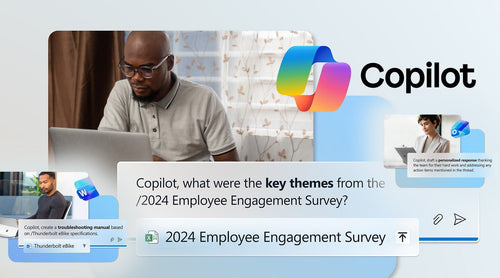
For more complex tasks like analyzing employee engagement surveys, Copilot identifies trends and sentiment insights that would otherwise take hours in Excel. Legal teams benefit from faster interpretation of regulatory updates. Instead of reviewing lengthy documents line by line, Copilot summarizes key changes and highlights what matters, so teams can respond quickly to new requirements. The result: time saved, improved clarity, and reduced risk. However, it is vital to remember that Copilot security relies on your existing permission structures to prevent data overexposure.
Sales and Marketing: Moving at the Speed of the Customer
Sales and marketing teams need to move fast and personalize at scale. Copilot helps them keep pace without sacrificing quality. Teams can quickly draft campaign briefs, email sequences, and social content in Microsoft 365 Chat or Word, starting with a strong foundation instead of a blank page.
Sales reps use Copilot in Outlook to draft personalized follow-ups, while Teams provides instant summaries of customer meetings so nothing gets missed. Copilot also interprets customer data from Excel or CRM systems, identifying behavioral and sentiment trends. These insights can be turned into PowerPoint presentations or sales enablement materials, all within Microsoft 365. This acceleration helps teams respond to opportunities faster and engage customers more effectively. Small to mid-sized businesses can access these same powerful tools through Microsoft 365 Copilot Business.

A Multiplier Across the Entire Organization
Each department sees benefits, but the real value of Copilot comes from how it connects workflows across the organization. Meetings end with clear summaries and action items, not scattered notes. Data moves from spreadsheets to accessible insights. Ideas move quickly from rough drafts to polished documents and presentations.
Every day, communication improves, too. Outlook helps users manage inboxes more efficiently by summarizing threads and drafting responses. Small time savings, repeated across hundreds or thousands of employees, add up to a significant organizational advantage.
The Role of Prompting in Unlocking Value
How teams use Copilot is one of the most important factors in its effectiveness. Teams that see the most impact learn to write clear, specific prompts and provide context. Instead of expecting perfect results right away, they treat Copilot as a collaborator, iterating and refining outputs to get the best results. Microsoft provides onboarding resources and learning tools to help organizations build these skills and accelerate adoption. As Copilot expands to more users, understanding the difference between licensed and unlicensed features becomes critical for maintaining a competitive edge.

Final Thoughts
Microsoft Copilot is changing how work gets done. It doesn’t replace people; it removes the friction that slows them down. Across IT, leadership, HR, and revenue teams, the benefits are clear: faster outputs, better insights, and more time for strategic work. Organizations that adopt these capabilities early aren’t just improving productivity: they’re redefining it.
Learn More About Microsoft Copilot
To help your team fully leverage AI and ensure your organization is ready for deployment, explore our deep dives into Copilot licensing, security, and strategy:
- Copilot Readiness Assessment: Evaluate your infrastructure and data governance before rolling out AI.
- Prepare for Microsoft Copilot Adoption: A strategic guide to ensuring high user buy-in and effective implementation.
- Is Microsoft Copilot Secure?: Understand how Copilot handles your data and what you need to do to prevent data overexposure.
- Top Questions IT Leaders Have About Microsoft Copilot: Expert answers to common concerns regarding deployment, management, and ROI.
- Is Microsoft Copilot Worth It?: An honest look at the cost-benefit analysis of AI integration for modern businesses.
- The Copilot Advantage: How smart AI integration acts as a force multiplier for your existing Microsoft 365 stack.
- Microsoft Security Copilot: Key Features & Capabilities: Discover how AI can transform your security operations and threat hunting.
- Microsoft 365 Copilot for Business: Everything small to mid-sized businesses need to know about adopting AI tools.
- The Microsoft 365 E7 Frontier Suite: Explore the ultimate bundle for enterprise-grade AI, security, and productivity.
- Copilot Chat Expansion: Learn about the latest updates to Copilot accessibility and what it means for your users.