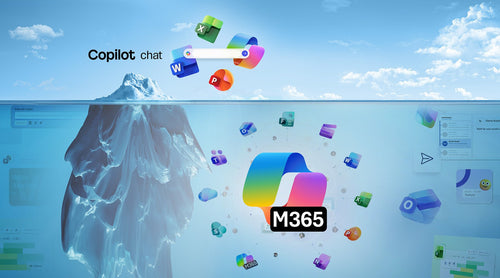
As AI becomes a built-in part of Microsoft 365, we’re seeing the same question from customers again and again: What’s the difference between Microsoft 365 Copilot and Copilot Chat?
The confusion is understandable. The names are similar, the interfaces sometimes look similar, and in some cases, Copilot even appears inside the same apps. But the reality is that these are two very different experiences designed for two very different use cases.
At TrustedTech, we spend a lot of time helping organizations set expectations around Copilot: what it can do today, how it behaves at scale, and when it actually delivers ROI. This article breaks down the difference between Microsoft 365 Copilot (licensed) and Copilot Chat (free), why the distinction matters, and what’s changing with Copilot Chat in April 2026.
The Difference in One Sentence
If you remember nothing else, remember this: Microsoft 365 Copilot understands your work; Copilot Chat answers your questions. That single distinction explains almost every capability gap between the two.

What Microsoft 365 Copilot Is Really Built For
Microsoft 365 Copilot is a licensed, app-native AI assistant embedded directly into Word, Excel, PowerPoint, Outlook, Teams, and other Microsoft 365 services. It’s designed for people who want AI to show up every day and meaningfully reduce the friction of work.
Instead of acting like a standalone chatbot, Microsoft 365 Copilot operates across your Microsoft 365 environment. It understands how your emails, meetings, files, and conversations relate to one another and can reason across them to produce useful, context-aware outputs.
In practice, that means Copilot can help summarize meetings and then turn those insights into follow-up emails, documents, or presentations without you having to explain the context each time. It’s consistent, always available, and built for scale.
TrustedTech insight: Microsoft 365 Copilot isn’t about novelty; it’s about reliability. Organizations see the most value when Copilot becomes part of repeatable workflows, not an occasional experiment.
It’s also worth clarifying naming: Microsoft 365 Copilot and Microsoft 365 Copilot Business refer to the same product. The difference is pricing, which depends on your base Microsoft 365 license and tenant size, not functionality.

What Copilot Chat Is (and Isn’t)
Copilot Chat is a free, chat-first AI experience available through the Microsoft 365 Copilot app. It’s designed to help users get value from AI quickly, without requiring a paid license. Copilot Chat works well for research, drafting, brainstorming, and general questions.
It’s primarily web-based and behaves much like other large-language-model chat experiences: you ask a question, and it responds. What it does not do is deeply understand your role, your projects, or how your work fits together across Microsoft 365. Even when Copilot Chat appears inside apps like Word or Excel, it remains a lightweight experience without cross-app reasoning or guaranteed availability.
From a TrustedTech perspective, Copilot Chat is best viewed as an onramp: a way for users and organizations to get comfortable with AI before deciding whether deeper integration is worth the investment.
Why Seeing Copilot Inside Apps Causes Confusion
One of the biggest sources of misunderstanding is simply where Copilot shows up. Some users open Word or PowerPoint, see Copilot available, and assume they have Microsoft 365 Copilot. In reality, they may be interacting with Copilot Chat embedded in an app rather than the licensed Copilot experience.
The difference isn’t cosmetic; it’s architectural. Copilot Chat inside an app is still a chat surface with limited context. Microsoft 365 Copilot, when embedded in an app, can reason across emails, meetings, files, and chats to produce results that reflect how work actually happens.

A Quick Comparison for Skimmers
| Capability | Copilot Chat (Free) | Microsoft 365 Copilot (Licensed) |
|---|---|---|
| Primary experience | Chat-based | App-native across Microsoft 365 |
| Work context | Limited | Full Microsoft 365 context |
| Cross-app reasoning | No | Yes |
| Availability | Subject to demand | Consistent and reliable |
| Best for | Research, drafting, brainstorming | Daily productivity and workflows |
| Licensing required | No | Yes |

Outlook: The One Intentional Exception
Microsoft has made one notable exception to the licensing model: Copilot in Outlook. All users, licensed or not, can use Copilot in Outlook to summarize emails, draft responses, and reference calendar context. This experience is intentionally narrow and scoped.
What users don’t get without a Microsoft 365 Copilot license is the ability to connect Outlook data with Teams chats, meeting transcripts, and files for deeper reasoning. Outlook serves as Microsoft’s lowest-risk entry point to Copilot, not a replacement for the full product.
When Copilot Chat Is Enough and When It Isn’t
Copilot Chat is often sufficient if your primary needs are:
- Writing or rewriting content
- Asking research-style questions
- Brainstorming ideas
- Exploring AI capabilities without a licensing commitment
Microsoft 365 Copilot becomes necessary when you want AI to understand your work holistically, operate consistently across apps, and support repeatable, everyday workflows. At TrustedTech, we typically see the strongest Copilot outcomes when organizations align licensing with roles that live inside Microsoft 365: all-day knowledge workers, managers, and project-driven teams.

Frequently Asked Questions
If I have Microsoft 365 Copilot, do I also get Copilot Chat?
Yes. Licensed users get the full Copilot experience in apps, along with Copilot Chat that includes priority access and richer work context.
Is Copilot Chat a “light” version of Microsoft 365 Copilot?
No. Even when it appears inside apps, Copilot Chat does not offer deep work context, cross-app reasoning, or guaranteed availability.
Why does Microsoft offer Copilot Chat for free?
Copilot Chat allows organizations, especially smaller ones, to explore AI in Microsoft 365 while keeping the licensed Copilot experience clearly differentiated.
Do I get Copilot in Outlook without a license?
Yes. Everyone has access to Copilot in Outlook for email and calendar-aware assistance, but this experience is intentionally limited.

Copilot Chat Changes Coming April 15, 2026
Microsoft is making changes to Copilot Chat to further clarify product boundaries and manage scale. These changes affect only Copilot Chat (free) users.
Starting April 15, 2026:
- Organizations with fewer than 2,000 seats will see no change. Copilot Chat may still appear inside Word, Excel, and PowerPoint, subject to demand.
- Organizations with 2,000 or more seats will no longer see Copilot Chat inside Word, Excel, PowerPoint, or OneNote unless users are licensed for Microsoft 365 Copilot.
- Access to Copilot Chat through the Microsoft 365 Copilot app remains unchanged.
This is a commercial segmentation decision, not a change in Copilot Chat capabilities.
TrustedTech Bottom Line
Copilot Chat is an excellent way to experience AI. Microsoft 365 Copilot is how AI becomes part of how work actually gets done. Understanding the difference helps organizations avoid confusion, set realistic expectations, and make smarter decisions about where Copilot licenses will deliver the most value.