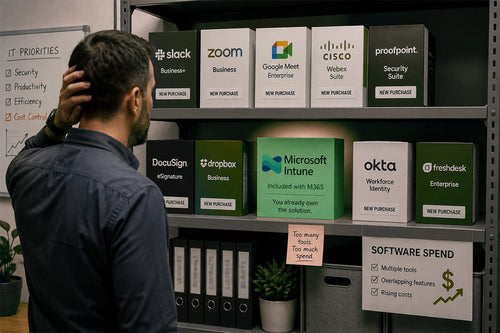
Microsoft 365 waste doesn’t always show up as underutilized licenses or ghost seats. The bigger problem has nothing to do with your M365 licensing; rather, you are paying for redundant software and services. The sprawl is scattered across separate software contracts: Zoom for meetings, Dropbox for file sharing, Slack for chat, or security tools that overlap with capabilities already included in Microsoft 365. Those costs are easy to miss because they sit outside the Microsoft invoice, even though the organization may already be paying for the same functionality through its existing M365 licensing.
This is SaaS rationalization, and it’s consistently one of the least-examined levers in a licensing review, largely because the waste doesn’t reside in one place. A rightsizing problem shows up clearly on a single seat-level report. A redundant-tool problem is scattered across IT’s budget, marketing’s budget, and whatever departmental card purchased a file-sharing tool three years ago. Nobody owns the full picture, so nobody catches the overlap. As a Microsoft Direct CSP with all six Microsoft Solutions Partner designations, TrustedTech reviews this exact overlap as part of every licensing engagement, not as a theoretical exercise.
Why This Waste Is Invisible on Paper
Modern Microsoft 365 licensing has evolved over the past decade, moving well beyond email and Office apps.
Microsoft Business and Enterprise licenses may already include built-in tools such as:
- Conferencing and calling (Teams)
- File storage and sync (SharePoint and OneDrive)
- e-signature (M365 eSignature)
- Endpoint security (Defender)
- Identity protection (Entra ID)
When a separate line item exists for a video conferencing tool, a cloud storage subscription, or a document-signing platform, that’s not always a bad decision on its own. It’s often the residue of a rollout that predates a licensing upgrade, or a team that adopted a tool before anyone checked what the tenant already included.
Auditing one software invoice makes it easy to spot waste. But when it comes to paying for multiple tools across many various invoices often approved by different budget owners, renewed on different cycles, and never cross-referenced against the Microsoft 365 SKU, things get lost in the mix.
Where Overlap Actually Shows Up
Redundancy tends to cluster in a handful of software tools that are important for company operations:
Collaboration and conferencing. Standalone video conferencing or team chat tools running in parallel with Teams, often because Teams was adopted for internal use while the legacy tool stayed for external meetings or webinars out of habit rather than necessity.
Storage and file sharing. Separate cloud storage subscriptions used for the same file-sharing and sync functions SharePoint and OneDrive already provide at the tenant’s current tier.
E-signature and document workflows. Paid signing platforms are doing work that overlaps with capabilities already licensed inside the Microsoft 365 stack.
Security and compliance add-ons. Point-solution security tools were purchased to fill a gap that was closed when the organization moved to E5 or added a security add-on, but no one circled back to cancel the redundant tools.
None of these are hypothetical. They’re the pattern TrustedTech’s licensing team looks for as part of every M365 Licensing Consultation, and they show up often enough that SaaS rationalization is one of the four core levers in TrustedTech’s License Optimization Framework, alongside rightsizing, ghost seat elimination, and procurement strategy.
Collaboration Tool Costs for a 200-Person Organization
Redundant tool spend is easiest to see with real numbers attached. Below are the 3 most commonly used SaaS tools and the associated costs for a 200-license user base. We used the current published list pricing for each tool and determined which Microsoft 365 capability already covers the same function. These figures assume every one of the 200 users holds a paid seat on the standalone tool; in practice, some organizations license only power users, so treat this as the ceiling on redundant spend rather than a guarantee that every organization is paying the full amount.
Zoom, replaced by Microsoft Teams
Zoom’s Business plan lists at approximately £13.53 per user, per month, billed annually.
- Annual cost: 200 × £13.53 × 12 = approximately £32,479/year
For organizations already standardized on Microsoft 365, Teams may make a separate Zoom subscription unnecessary. If employees are using Teams for day-to-day meetings and it already meets the company’s webinar and external meeting needs, keeping Zoom alongside it can amount to paying twice for much of the same work.
Slack, replaced by Microsoft Teams chat
Slack’s Business+ plan, the tier most organizations need for SSO and compliance exports, lists at approximately £11.07 per user, per month, billed annually.
- Annual cost: 200 × £11.07 × 12 = approximately £26,579/year
Again, Teams is an all-encompassing chat and video tool that can replace both Zoom and Slack. This is where the overlap compounds: a single Microsoft 365 license can already replace two separate line items.
Dropbox, replaced by OneDrive and SharePoint
Dropbox’s Standard business plan lists at approximately £13.29 per user, per month, billed annually. Published pricing varies somewhat by promotion and billing term, so confirm the current rate before budgeting against it.
- Annual cost: 200 × £13.29 × 12 = approximately £31,895/year
OneDrive for Business and SharePoint provide many of the same core cloud storage capabilities as Dropbox, including file sync, sharing, and version history. Depending on tier, this can mean 1TB of storage per user or more, pooled and centrally governed rather than managed through a separate vendor.
What this adds up to: Adding up all three SaaS applications: Zoom, Slack, and Dropbox, comes to roughly £90,800 a year in software spend that may duplicate capabilities already included in a Microsoft 365 license the organization is already paying for. Even organizations running these tools at partial seat counts or only for specific teams can still see tens of thousands of pounds in avoidable annual spend when conferencing, chat, and storage overlap are combined.
Same Story with the Security Stack
Security is where the savings calculation gets more nuanced. A company running E5 may already have endpoint, identity, or compliance capabilities covered inside Microsoft 365, while the same may not be true for a company on E3 or Business Premium. Before cutting a separate security product, you need to look at the exact license tier and the feature the product is there to provide.
Okta, overlapping with Microsoft Entra ID
Okta’s Essentials suite, the tier most mid-market organizations need for adaptive MFA and lifecycle management, lists at approximately £12.55 per user, per month, billed annually.
- Annual cost: 200 × £12.55 × 12 = approximately £30,123/year
Microsoft Entra ID P1 provides Conditional Access and multi-factor authentication, which can block up to 99% of attacks against online accounts. Entra ID P2 adds identity protection and risk-based access policies. The Okta spend above can become a duplicate cost, rather than a new capability, once the tenant is on the right tier.
CrowdStrike Falcon Pro, overlapping with Microsoft Defender for Endpoint
CrowdStrike’s Falcon Pro tier, which covers next-gen antivirus and endpoint detection, lists at approximately £73.82 per device per year.
- Annual cost: 200 × £73.82 = approximately £14,765/year
Microsoft Defender for Endpoint P2 is included with Microsoft 365 E5, and Defender for Business is included with Business Premium. Organizations on E3 without the E5 security add-on won’t have this covered natively, so this is the clearest example of why the replacement calculation depends on current licensing, not just on owning “Microsoft 365” in the abstract. TrustedTech’s Endpoint Protection guidance covers how to evaluate this gap by tier before canceling a standalone EDR contract.
Standalone DLP and compliance tools, overlapping with Microsoft Purview
Point solutions for data loss prevention, sensitivity labeling, and eDiscovery are common additions when an organization’s Microsoft 365 tier doesn’t yet provide the compliance depth required by a specific regulation. Basic Purview capabilities, including sensitivity labels and foundational DLP policies, are included starting at E3. Insider risk management, Purview Premium eDiscovery, and advanced data lifecycle management require E5 or a Purview add-on. The right question isn’t whether Purview is “free,” it’s whether the organization’s current tier already includes the specific compliance capability the standalone tool was purchased to cover.
What This Looks Like in Practice
These aren’t abstract numbers. TrustedTech’s own client engagements show what happens when tool and license overlap is addressed together as part of a full licensing review, rather than when tool consolidation is evaluated in isolation.
Ellumen, a 200-employee federal contracting firm with a one-person IT team, is a close real-world match for the scenario above: a mid-sized organization with a single administrator responsible for the entire Microsoft 365 environment. Ellumen achieved a 30% immediate reduction in Microsoft licensing costs and a 50% reduction in total Microsoft support spend compared to buying direct. Edwardian Hotels London, a hospitality organization with over 10,000 employees, right-sized its E3 and E5 licensing mix and eliminated unused features with zero downtime during the transition. Nordic Investment Bank, a European financial institution with 500-plus users, moved from an Enterprise Agreement to CSP and captured 15 to 20% in annual licensing savings while cutting support response time from 1 to 2 days to minutes.
Worth being precise about what these figures represent: they reflect the combined effect of TrustedTech’s full License Optimization Framework, of which third-party tool rationalization is one of four levers, alongside license rightsizing, ghost seat elimination, and procurement strategy. None of these engagements isolated the tool-consolidation lever to report a standalone savings figure. What they demonstrate is that when an organization treats Microsoft 365 spend as a single reviewable system rather than a set of disconnected line items, the savings are real and repeatable, not theoretical.
Why This Lever Gets Skipped
Finding unused licenses by cross-checking one invoice is straightforward. But evaluating your entire SaaS sprawl and cross-referencing it with Microsoft 365 tools isn’t easy. A team may still depend on a Zoom integration, a Dropbox workflow, or a permission structure that does not map neatly to Microsoft 365. That means the savings can be real, but getting there takes conversations with the people using the software and a closer look at how it fits into their day-to-day work.
The issue is that the contracts for these tools do not all align on renewal dates. Finance may look at the Microsoft 365 renewal, while Zoom, Dropbox, Slack, or a security platform renew through completely different budgets and owners. Unless someone compares those contracts side by side, it is easy to keep renewing software that Microsoft 365 already covers.
Finding Software M365 Can Replace
The goal isn’t to cancel every SaaS product that overlaps with Microsoft 365. Some tools may be so ingrained that eliminating them is nearly impossible. So make sure to perform a sanity check on how employees use these third-party tools. A company may be able to drop Zoom for most employees but keep a small number of licenses for a team that depends on a specific webinar workflow. The same can happen with storage, security, or compliance software. The savings come from removing unnecessary licenses where Microsoft 365 already does the job, without forcing teams off software they still genuinely need. Tool rationalization and license rightsizing aren’t independent decisions. Getting the SKU tier right changes what’s actually redundant.
The Broader Renewal Pattern
Microsoft 365 spend is often evaluated as a single line item rather than as a platform that already includes capabilities the organization is paying for elsewhere. It’s the same visibility gap that produces over-licensed seats and unreclaimed ghost accounts, just distributed across a different set of invoices. Organizations that treat licensing review as an annual, one-time event tend to miss this category entirely, since no one checks new SaaS purchases against the tenant’s current entitlements as they’re made.
Frequently Asked Questions
Can Microsoft 365 really replace other SaaS products?
In many cases, yes. Microsoft 365 already includes capabilities for meetings, chat, file sharing, identity, security, compliance, and document workflows. The opportunity is to find the places where a separate subscription is doing work your current M365 licensing already covers.
How can I tell if a SaaS product is actually redundant?
First, look into who is actually using the tool. A product may look replaceable on paper, but still support a workflow, integration, or feature that your Microsoft 365 environment does not handle well enough. The goal is not to remove software just because there is overlap. It is to identify where you are genuinely paying twice for the same capability.
Does my Microsoft 365 license determine what I can replace?
Absolutely. What is redundant depends heavily on your license mix. Business Premium, E3, and E5 include different levels of security, compliance, identity, and collaboration functionality. A third-party product that makes sense with one licensing tier may be unnecessary with another.
Should we upgrade Microsoft 365 just to eliminate another SaaS product?
Not automatically. In some cases, moving users to a higher Microsoft 365 tier can replace several standalone products and lower total software spend. But in other cases, the additional cost is not justified, so staying on the current tier and keeping a specialized third-party product may still be the better option.
Is SaaS consolidation the same as Microsoft 365 license optimization?
They are related, but they solve different problems. License optimization looks at whether you have the right Microsoft 365 licenses and seat counts. SaaS consolidation looks beyond the Microsoft bill to find other software contracts that overlap with what those licenses already include.
Where does the biggest SaaS sprawl usually show up?
Collaboration, conferencing, cloud storage, identity, endpoint security, and compliance are common places to look first. These are also areas where Microsoft has added significant capabilities over time, so organizations may end up renewing older software without realizing that their Microsoft 365 environment now covers much of the same ground.
Where This Fits in a Full Licensing Review
Tool consolidation rarely gets addressed on its own. It works best as one part of a structured review that also covers license rightsizing, ghost seat elimination, and renewal timing, since the answer to “Is this tool redundant?” often depends on which SKU tier the organization ends up on. TrustedTech’s licensing consultations evaluate all four levers together and quantify the savings in an M365 Usage Report before any procurement changes are made.
Curious whether your organization is paying twice for a capability you already own? Schedule a no-commitment M365 Licensing Consultation with TrustedTech’s advisors and get a clear view of where the overlap is.